Most documentation platforms talk about "extensibility" the way airlines talk about "legroom" — technically present, practically disappointing. We wanted Rasepi's architecture to be genuinely extensible without becoming unpredictable, so we built three interlocking systems: plugins for capability, action guards for control, and pipelines for deterministic execution.
This post walks through how each one works in our actual codebase.
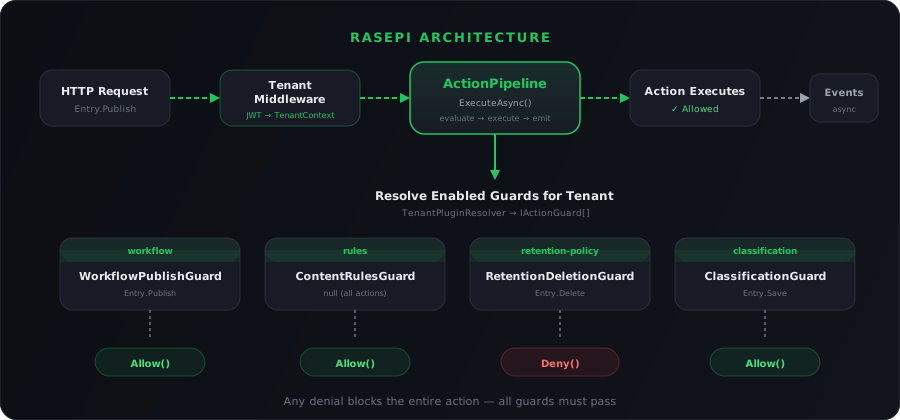
The plugin system: modular by design
Every plugin in Rasepi implements IPluginModule — a single interface that declares what the plugin is, what services it needs, and what routes it exposes:
public interface IPluginModule
{
    PluginManifest Manifest { get; }
    void RegisterServices(IServiceCollection services);
    void MapRoutes(IEndpointRouteBuilder routes);
}
The PluginManifest is pure data. It describes the plugin without executing anything:
public sealed class PluginManifest
{
    public required string Id { get; init; }
    public required string Name { get; init; }
    public required string Version { get; init; }
    public string Description { get; init; }
    public string Category { get; init; }
    public IReadOnlyDictionary<string, string> UiContributions { get; init; }
    public bool HasSettings { get; init; }
    public bool HasEndpoints { get; init; }
    public IReadOnlyList<string> Dependencies { get; init; }
}
Notice UiContributions — that dictionary maps frontend extension points to component names, so the Vue frontend knows which UI components each plugin contributes (a toolbar button, a sidebar panel, a settings page).
Registration is one line per plugin
At startup, we register plugins through a fluent API:
var pluginRegistry = new PluginRegistry();

pluginRegistry
    .AddPlugin<WorkflowPluginModule>(builder.Services)
    .AddPlugin<RulesPluginModule>(builder.Services)
    .AddPlugin<RetentionPluginModule>(builder.Services)
    .AddPlugin<ClassificationPluginModule>(builder.Services);
Each call instantiates the module, stores it in the registry, and calls RegisterServices() to wire up its dependencies. After the app builds, a single line maps all plugin routes:
app.MapPluginRoutes(pluginRegistry);
Under the hood, each plugin gets a scoped route group at /api/plugins/{pluginId}/ with authorization automatically applied.
Real example: the Workflow plugin
Here is what a real plugin looks like — the Workflow & Approvals module:
public sealed class WorkflowPluginModule : IPluginModule
{
    public const string PluginId = "workflow";

    public PluginManifest Manifest { get; } = new()
    {
        Id = PluginId,
        Name = "Workflow & Approvals",
        Version = "1.0.0",
        Description = "Adds approval workflows to entry publishing.",
        Category = "Workflow",
        HasSettings = true,
        HasEndpoints = true,
        UiContributions = new Dictionary<string, string>
        {
            ["entry.toolbar.publish"] = "WorkflowPublishButton",
            ["entry.sidebar.status"]  = "WorkflowStatusPanel",
            ["hub.admin.settings"]    = "WorkflowHubSettings",
        }
    };

    public void RegisterServices(IServiceCollection services)
    {
        services.AddScoped<IWorkflowService, WorkflowService>();
        services.AddScoped<IActionGuard, WorkflowPublishGuard>();
    }

    public void MapRoutes(IEndpointRouteBuilder routes)
    {
        WorkflowEndpoints.Map(routes);
    }
}
The core platform never references WorkflowService or WorkflowPublishGuard directly. It discovers them through the DI container. That is the key to zero coupling — the core app never touches plugin code.
Action guards: the control layer
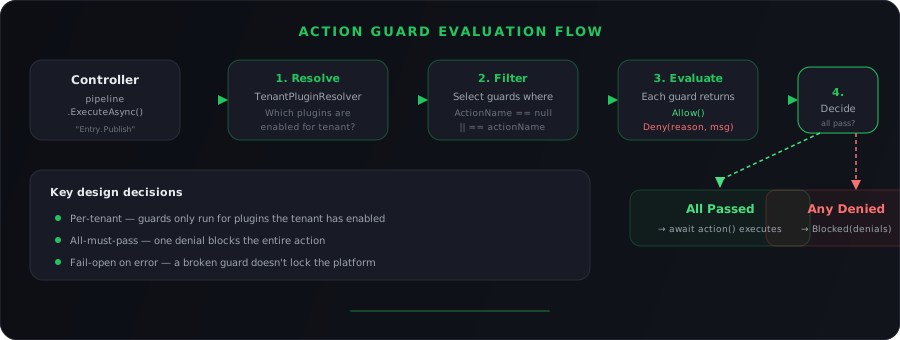
Plugins add capability. Action guards decide whether that capability — or any core action — is allowed to proceed. They are synchronous validators that intercept operations before execution.
The interface is deliberately minimal:
public interface IActionGuard
{
    string PluginId { get; }
    string? ActionName { get; }  // null means guard ALL actions

    Task<ActionGuardResult> EvaluateAsync(
        ActionGuardContext context,
        IServiceProvider services,
        CancellationToken ct = default);
}
When ActionName is null, the guard runs for every action. When it's set to something like "Entry.Publish", it only intercepts that specific action.
The context and result contracts
Every guard receives a typed context with the action name, tenant, user, entity, and a property bag:
public sealed record ActionGuardContext(
    string ActionName,
    Guid TenantId,
    Guid UserId,
    Guid EntityId,
    IReadOnlyDictionary<string, object?> Properties)
{
    public T? Get<T>(string key) =>
        Properties.TryGetValue(key, out var v) && v is T typed
            ? typed : default;
}
And every guard returns a predictable result — allow, deny, or allow-with-modifications:
public sealed record ActionGuardResult
{
    public bool IsAllowed { get; init; }
    public string? ReasonCode { get; init; }
    public string? Message { get; init; }
    public IReadOnlyDictionary<string, object?>? Modifications { get; init; }

    public static ActionGuardResult Allow() =>
        new() { IsAllowed = true };

    public static ActionGuardResult Deny(
        string reasonCode, string message) =>
        new() { IsAllowed = false, ReasonCode = reasonCode, Message = message };
}
The Modifications field is important — a guard can approve an action but rewrite part of the content (for example, redacting secrets before publish).
Canonical action names
We define all interceptable actions as string constants so there is zero ambiguity about what a guard can target:
public static class ActionNames
{
    public static class Entry
    {
        public const string Create  = "Entry.Create";
        public const string Save    = "Entry.Save";
        public const string Publish = "Entry.Publish";
        public const string Delete  = "Entry.Delete";
        public const string Archive = "Entry.Archive";
        public const string Renew   = "Entry.Renew";
    }

    public static class Hub
    {
        public const string Create = "Hub.Create";
        public const string Delete = "Hub.Delete";
        public const string TransferOwnership = "Hub.TransferOwnership";
    }

    public static class Translation
    {
        public const string Create  = "Translation.Create";
        public const string Publish = "Translation.Publish";
    }
}
Real example: blocking publish without approval
The Workflow plugin registers a guard that intercepts Entry.Publish:
public sealed class WorkflowPublishGuard : IActionGuard
{
    public string PluginId => WorkflowPluginModule.PluginId;
    public string? ActionName => ActionNames.Entry.Publish;

    public async Task<ActionGuardResult> EvaluateAsync(
        ActionGuardContext context,
        IServiceProvider services,
        CancellationToken ct = default)
    {
        var db = services.GetRequiredService<RasepiDbContext>();
        var entry = await db.Entries
            .AsNoTracking()
            .FirstOrDefaultAsync(e => e.Id == context.EntityId, ct);

        if (entry is null)
            return ActionGuardResult.Allow();

        var workflowService = services.GetRequiredService<IWorkflowService>();
        var check = await workflowService
            .CheckPublishAllowedAsync(entry.Id, entry.HubId);

        if (check.IsAllowed)
            return ActionGuardResult.Allow();

        return ActionGuardResult.Deny(
            "workflow.approval_required",
            check.Message ?? "Approval required before publishing.");
    }
}
The core platform knows nothing about approval workflows. It just calls Entry.Publish through the pipeline, and the guard blocks it if the workflow has not been completed.
The action pipeline: where everything converges
The ActionPipeline is the single execution path for all guarded operations. It resolves which guards apply, evaluates them, and either blocks or executes the action.
public sealed class ActionPipeline : IActionPipeline
{
    public async Task<ActionPipelineResult> ExecuteAsync(
        string actionName,
        ActionGuardContext context,
        Func<Task> action,
        CancellationToken ct = default)
    {
        var result = await EvaluateAsync(actionName, context, ct);
        if (!result.IsAllowed) return result;

        await action();  // All guards passed — execute

        return result;   // Return modifications for caller
    }
}
The EvaluateAsync method does the heavy lifting:
public async Task<ActionPipelineResult> EvaluateAsync(
    string actionName,
    ActionGuardContext context,
    CancellationToken ct = default)
{
    // 1. Which plugins are enabled for this tenant?
    var enabledPlugins = await _resolver.GetEnabledPluginIdsAsync();

    // 2. Which guards match this action?
    var applicable = _guards
        .Where(g => enabledPlugins.Contains(g.PluginId))
        .Where(g => g.ActionName == null || g.ActionName == actionName)
        .ToList();

    // 3. Evaluate each guard
    var denials = new List<ActionGuardResult>();
    var modifications = new List<ActionGuardResult>();

    foreach (var guard in applicable)
    {
        try
        {
            var guardResult = await guard.EvaluateAsync(context, _services, ct);
            if (!guardResult.IsAllowed)
                denials.Add(guardResult);
            else if (guardResult.Modifications?.Count > 0)
                modifications.Add(guardResult);
        }
        catch (Exception ex)
        {
            _logger.LogError(ex, "Guard threw. Treating as Allow.");
        }
    }

    // 4. Any denial blocks the whole action
    if (denials.Count > 0)
        return ActionPipelineResult.Blocked(denials);

    return modifications.Count > 0
        ? ActionPipelineResult.Allowed(modifications)
        : ActionPipelineResult.Allowed();
}
Three important design decisions here:
- Per-tenant resolution — the
TenantPluginResolverchecks which plugins each tenant has installed and enabled. A guard for a disabled plugin never runs. - All-must-pass — if any guard denies, the action is blocked. This is a deliberate security stance.
- Guard errors fail open — if a guard throws an exception, it is logged and treated as
Allow(). This prevents a broken plugin from locking the entire platform.
Per-tenant plugin resolution
The resolver queries the TenantPluginInstallations table (automatically scoped to the current tenant by EF global query filters):
public sealed class TenantPluginResolver : ITenantPluginResolver
{
    public async Task<IReadOnlySet<string>> GetEnabledPluginIdsAsync(
        CancellationToken ct = default)
    {
        if (_cache is not null) return _cache;

        var ids = await _db.TenantPluginInstallations
            .Where(i => i.IsEnabled)
            .Select(i => i.PluginId)
            .ToListAsync(ct);

        _cache = ids.ToHashSet();
        return _cache;
    }
}
Event-driven side effects
Actions are synchronous. Side effects are not. After an action completes, the service publishes a domain event:
await _eventPublisher.PublishAsync(
    EventNames.Entry.Created, entry.Id, new { entry.OriginalLanguage });
Events are enqueued to an in-memory channel and processed by a background EventConsumerWorker. The worker routes events to multiple systems:
- Activity tracking — logs who did what, when
- Translation billing — tracks costs per provider
- Plugin event handlers — any plugin can subscribe to domain events
Plugin event handlers implement IPluginEventHandler:
public interface IPluginEventHandler
{
    string PluginId { get; }
    IReadOnlyList<string> SubscribedEvents { get; }

    Task HandleAsync(
        string eventName, Guid entityId,
        Guid? tenantId, Guid? userId,
        string payloadJson, IServiceProvider services,
        CancellationToken ct = default);
}
The worker only invokes handlers whose plugin is enabled for the tenant. This means plugin A's side effects never leak into a tenant that only has plugin B installed.
The block-level translation engine
This is where the architecture pays off most visibly.
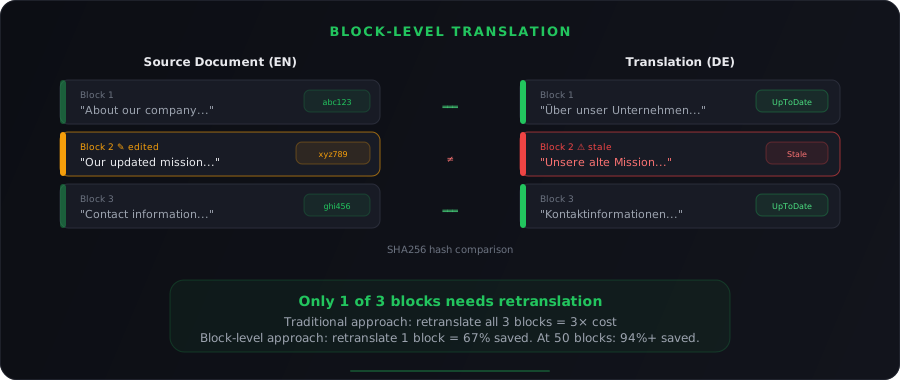
Traditional platforms translate entire documents. We translate individual blocks — paragraphs, headings, list items. When a user edits one paragraph in a 50-block document, only that paragraph needs retranslation. That is the source of our 94% cost savings.
How blocks are created from TipTap JSON
When a user saves a document, the TipTap editor sends JSON like this:
{
  "type": "doc",
  "content": [
    {
      "type": "paragraph",
      "attrs": { "blockId": "a1b2c3d4-..." },
      "content": [{ "type": "text", "text": "Hello world" }]
    }
  ]
}
The BlockTranslationService parses this JSON and creates individual EntryBlock records:
public async Task<List<EntryBlock>> CreateBlocksFromDocumentAsync(
    Guid entryId, string language, string contentJson,
    int version, Guid userId)
{
    var doc = JsonDocument.Parse(contentJson);
    var content = doc.RootElement.GetProperty("content");

    int position = 0;
    foreach (var node in content.EnumerateArray())
    {
        var blockType = node.GetProperty("type").GetString();
        var blockJson = JsonSerializer.Serialize(node);

        // Strip metadata attrs before hashing
        var hashInput = StripBlockMetaAttrs(blockJson);

        var block = new EntryBlock
        {
            Id = ExtractOrGenerateBlockId(node),
            EntryId = entryId,
            Language = language,
            Position = position++,
            BlockType = blockType,
            ContentJson = blockJson,
            ContentHash = CalculateContentHash(hashInput),
            IsNoTranslate = ExtractNoTranslateFlag(node),
            Version = version,
        };

        _context.EntryBlocks.Add(block);
    }

    await _context.SaveChangesAsync();
    return blocks;
}
SHA256 hashing for stale detection
The content hash is the core of stale detection. We hash the block content (after stripping metadata attributes like blockId and deleted) using SHA256:
private string CalculateContentHash(string content)
{
    using var sha256 = SHA256.Create();
    var hashBytes = sha256.ComputeHash(Encoding.UTF8.GetBytes(content));
    return Convert.ToHexString(hashBytes);
}
When a source block changes, its hash changes. The system then compares every translation block's SourceContentHash to the current source hash — mismatches are marked Stale:
public async Task MarkTranslationsAsStaleAsync(List<Guid> changedBlockIds)
{
    var affected = await _context.TranslationBlocks
        .Where(t => changedBlockIds.Contains(t.SourceBlockId))
        .ToListAsync();

    foreach (var translation in affected)
    {
        translation.Status = TranslationStatus.Stale;
        translation.UpdatedAt = DateTime.UtcNow;
    }

    await _context.SaveChangesAsync();
}
Structure adaptation
Translators can change block types across languages. An English bullet list might become a German numbered list — a cultural preference. The system tracks this:
var translation = new TranslationBlock
{
    SourceBlockId = sourceBlockId,
    Language = targetLanguage,
    BlockType = translatedBlockType,
    SourceBlockType = sourceBlock.BlockType,
    IsStructureAdapted = translatedBlockType != sourceBlock.BlockType,
    SourceContentHash = sourceBlock.ContentHash,
    Status = TranslationStatus.UpToDate,
};
Translation providers as plugins
External translation services (DeepL, Google Translate, etc.) plug in through ITranslationProviderPlugin:
public interface ITranslationProviderPlugin : IRasepiPlugin
{
    string[] GetSupportedLanguages();

    Task<string> TranslateAsync(
        string text, string sourceLanguage, string targetLanguage);

    Task<TranslationBatchResult> TranslateBatchAsync(
        Dictionary<string, string> texts,
        string sourceLanguage, string targetLanguage);
}
The batch method receives a dictionary of block IDs to content, translates them all, and returns the translations with a billed character count. Because we only send stale blocks, not the entire document, costs stay minimal.
Tenant isolation: the invisible safety net
Every system described above runs inside strict tenant isolation.
The TenantContextMiddleware resolves the tenant from the JWT on every request and verifies membership:
public async Task InvokeAsync(
    HttpContext context, TenantContext tenantContext, RasepiDbContext db)
{
    var tenantIdClaim = context.User.FindFirstValue("tenant_id");
    var userIdClaim = context.User.FindFirstValue(ClaimTypes.NameIdentifier);

    // Populate scoped context
    tenantContext.TenantId = Guid.Parse(tenantIdClaim);
    tenantContext.UserId = Guid.Parse(userIdClaim);

    // Verify membership — fail closed
    var membership = await db.TenantMemberships
        .Where(m => m.TenantId == tenantContext.TenantId
                  && m.UserId == tenantContext.UserId)
        .FirstOrDefaultAsync();

    if (membership == null)
    {
        context.Response.StatusCode = 401;
        return;  // No membership = no access
    }
}
Entity Framework global query filters ensure that even if a developer forgets to filter by tenant, the database layer does it automatically:
modelBuilder.Entity<Hub>()
    .HasQueryFilter(h => h.TenantId == _tenantContext.TenantId);
The result: db.Hubs.ToListAsync() always returns only the current tenant's hubs. Data leaks require actively bypassing the query filter — which is banned in our codebase.
The full picture
When a user clicks "Publish" on an entry, here is what happens:
- Request enters — authentication validates the JWT,
TenantContextMiddlewareresolves and verifies the tenant - Controller calls pipeline —
IActionPipeline.ExecuteAsync("Entry.Publish", context, action) - Pipeline resolves guards — queries which plugins the tenant has enabled, selects applicable guards
- Guards evaluate — the Workflow guard checks for approvals, the Retention guard checks for policy, the Rules guard validates content
- All pass? Action executes — the entry is published
- Events fire —
Entry.Publishedevent is enqueued - Background worker processes — activity is logged, translation billing is updated, plugin event handlers are called
- Block translations checked — stale blocks are identified for retranslation
Each layer does its job. No layer reaches into another. That is the architecture.
We did not build this because extensibility is trendy. We built it because a documentation platform that cannot adapt to each team's workflow will eventually be replaced by one that can — and a platform that adapts without guardrails will eventually break something that matters.